
Webhooks (beta)
Maximizer CRM offers the capability to subscribe to events on Leads, Opportunities, and AddressBook, for actions such as creation, updating, and deletion. Currently, our webhooks functionality is in the closed BETA stage.
If you wish to explore this feature, please send an email with your inquiry to [email protected] and include the following information:
- Full name.
- E-mail address.
- Organization name.
- Database alias.
- The specific events for which you desire to receive webhooks (see the list of supported webhooks below).
What are webhooks?
Webhooks are a method of close-to-real-time communication between different applications or systems over the internet. They allow one system to notify another system or application about specific events as they happen. In essence, a webhook is a way for an application to provide other applications with immediate and automated updates or data rather than requiring the receiving application to poll or check for changes repeatedly.
Webhooks are widely used in web development, API integrations, and various online services to enable the exchange of information between different platforms. They are a powerful tool for creating close-to-real-time, event-based workflows and system integrations, allowing for timely updates and seamless application interactions.
Difference between webhooks and API
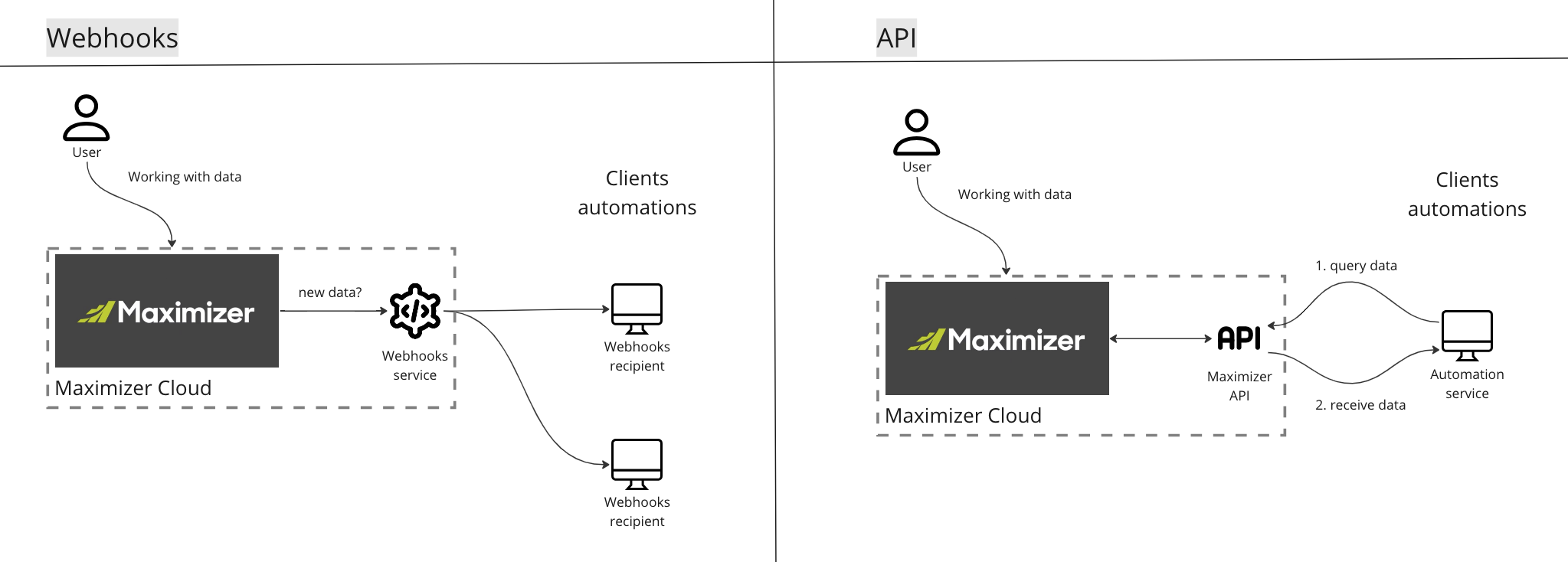
Available webhooks
We support organization-level webhooks only. If you subscribe to a webhook, you receive webhooks about all objects, not just for specific users. You must have administrator access rights to configure webhooks.
At the moment, we support the following webhooks:
Leads module:
- Create
- Update
- Delete
Opportunities module:
- Create (limited payload)
- Update (limited payload)
- Delete (limited payload)
- Opportunity Stage Change
Export events:
- The contacts list was exported
- The opportunities list was exported
Appointments module:
- Create (limited payload)
- Update (limited payload)
- Delete (limited payload)
You can find examples of payloads in the Postman collection.
How to work with webhooks?
Vocabulary
- Target - a web service ready to accept Maximizer's POST requests.
- Subscription - a subscription for a specific webhook. The subscription might have a filter.
During the BETA program, we don't expose Webhooks API, but we can configure it on-demand if you provide us with a Target and a list of desired webhooks.
Targets requirements
Targets must respond with a 200 OK HTTP code in 2 seconds. If Target hasn't responded or responded with a different HTTP code, we make two more attempts to deliver a webhook after some delay.
If a Target isn't available after three attempts, the webhook will be discarded and won't be delivered.
How to start receiving webhooks
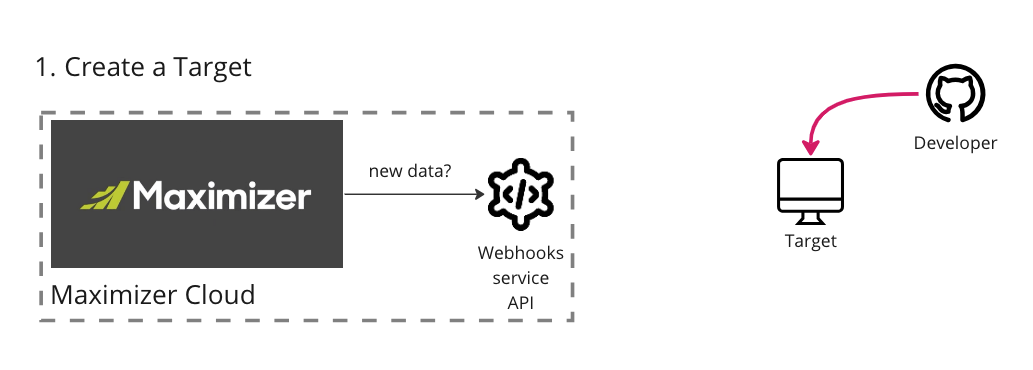
First, you need to prepare a Target. The Target URL can include query parameters.
If you want to protect your URL, you can include any secret in the query parameters or configure the Target to send specific headers.
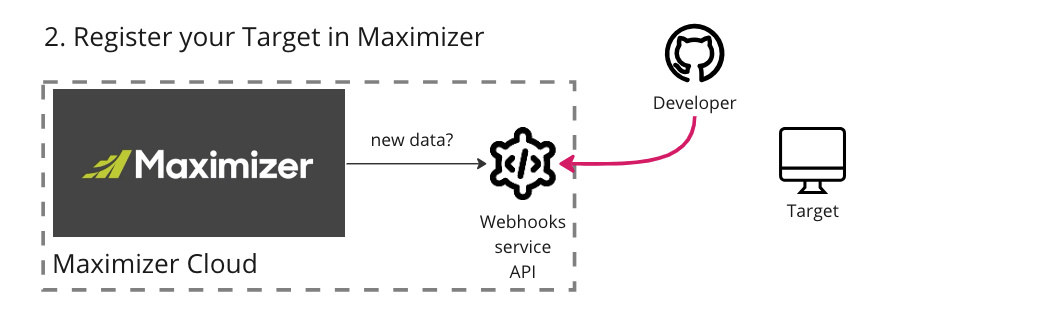
As a second step, you must register your Target in Maximizer using Webhooks API.
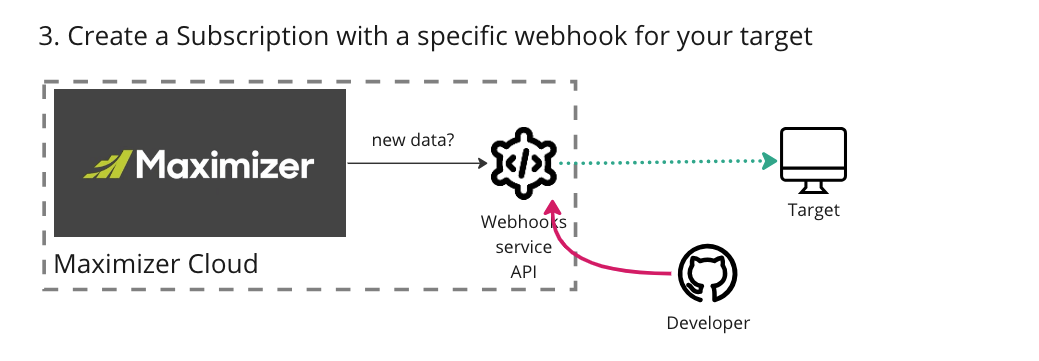
As a third step, you must create a Subscription for a specific webhook using Webhooks API. The subscription can include simple filters, like "greater than" for numbers and equal operations. You can also group a few filter conditions by using "AND"/"OR."
That's it! After creating a subscription, you will receive webhooks to your target URL.
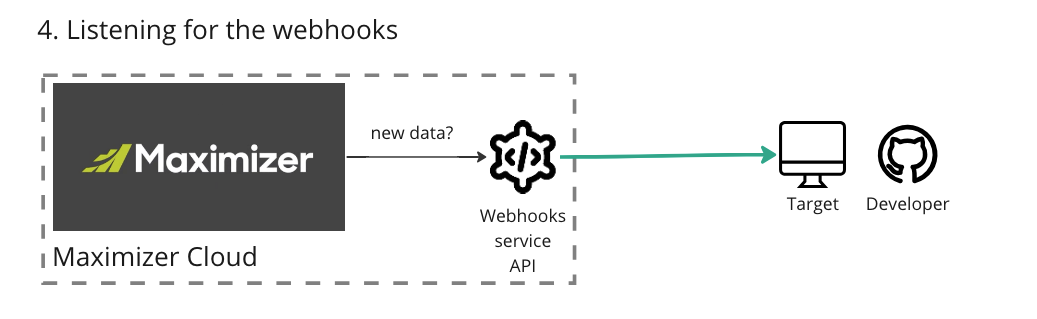
Check out examples of payloads in the Postman collection.
Webhook's payload
Example of the "opportunity stage change" webhook:
{
    "id": "642aad1c-88ca-4abb-9314-4bb681cf4c67",
    "timestamp": "2023-09-28T18:02:22.0620672Z",
    "workspaceId": "108F314C-6787-4EE6-BE49-C0E0C651F139",
    "recipients": [],
    "options": null,
    "processedTimestamp": "2023-09-28T18:05:53.0971459Z",
    "entity": "Opportunity",
    "data": {
        "op": "update",
        "original": {
            "key": "T3Bwb3J0dW5pdHkJMjIwNTA1MjUyMjI3MzkzMDQwMDMwTwkw",
            "salesStageSetupKey": "U2FsZXNQcm9jZXNzU3RhZ2VTZXR1cAkyMjA0MDYyNTEzNTI0Nzk5ODAwMDdHCTA=",
            "salesStageSetupName": "Budget Agreement",
            "salesProcessSetupKey": "U2FsZXNQcm9jZXNzCURFRkFVTFQJMA==",
            "salesProcessSetupName": "Sales Process",
            "objective": "5000 Samples",
            "revenue": 12000.0,
            "userKey": "VXNlcglNQVNURVI="
        },
        "new": {
            "key": "T3Bwb3J0dW5pdHkJMjIwNTA1MjUyMjI3MzkzMDQwMDMwTwkw",
            "salesStageSetupKey": "U2FsZXNQcm9jZXNzU3RhZ2VTZXR1cAkyMjA0MDYyNTEzNTIzMjM3MzAwMDZHCTA=",
            "salesStageSetupName": "Proposal"
        },
        "version": "1.1"
    }
}
Each webhook has a few required fields:
- "id" - unique webhook id.
- "timestamp" - the timestamp when the webhook was created.
- "workspaceId" - a unique ID for the database.
- "recepients" - a list of user keys who must receive a webhook.
- "processedTimestamp" - the timestamp when the HTTP request (webhook) was sent to a Target.
- "entity" - the entity (object name) of produced webhook.
- "data.op" - the name of operation with the entity (example: update, delete, create).
- "data.original" - the original payload of an entity.
- "data.new" (optional) - exists if we change some values.
- "data.version" - version of the event. It represents the version of the object in Octopus API.
Webhooks versioning
We have "data.version" as part of a webhook payload. If you receive "data.version" equals something like "1.13," that means an entity in the API has a version "1.13," where "1" is major and "13" is minor.
For any technical questions or discussions - please reach us via Discussions
Updated about 1 year ago