
A browser-based console for trying the full OAuth flow against the real endpoints, without writing any code.
The Test Console is a browser page that runs the full Authorization Code Flow against the real endpoints, without writing any code. Use it to verify your client_id and redirect_uri, watch each step of the flow, and inspect the tokens you get back.
https://auth.maximizer.com/testThe console is a plain client of the public Authorize and Token endpoints. Nothing you enter is stored on the server; the form values are saved in your browser's local storage so you don't have to re-enter them. The Clear saved settings button removes them.
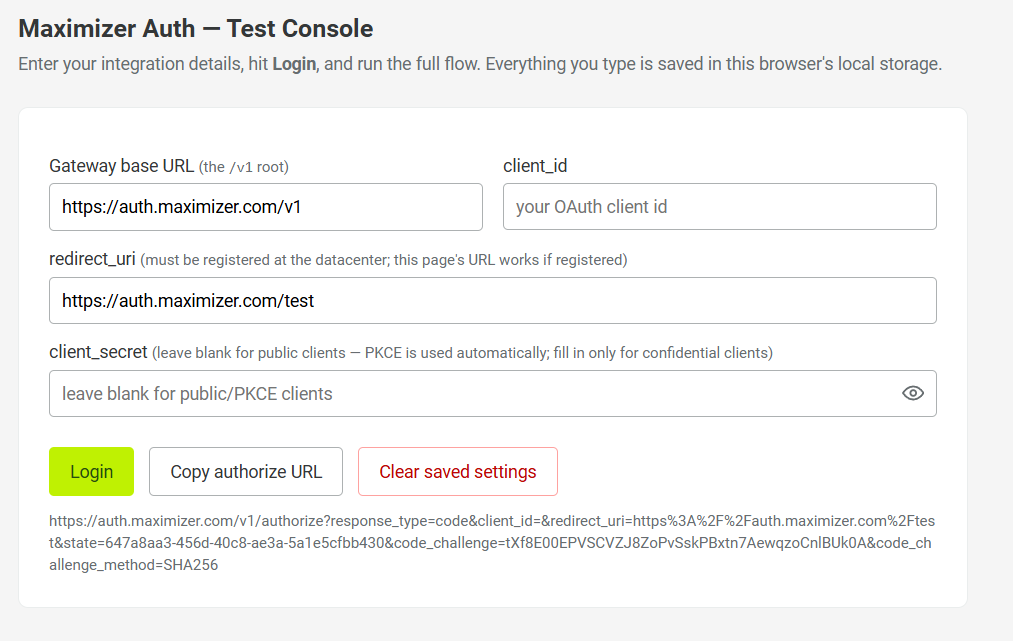
What You Need
- Your
client_id. - A
redirect_uriregistered for that client. - Your
client_secret, only if you are testing as a confidential client. Leave the field blank to test as a public client: the console then uses PKCE automatically.
Running the Flow
- Enter your details and click Login. The console builds the authorize URL (you can inspect it at the bottom of the form, or copy it with Copy authorize URL) and redirects you into the sign-in flow.
- Sign in as you would in any integration.
- When the browser returns to the console, it catches the
codeparameter, exchanges it at the Token endpoint, and displays the response. - The console also decodes the refresh token so you can inspect its contents, and a Refresh button lets you exercise the refresh grant with the token you just received.
Tip: If you register the console's own URL (https://auth.maximizer.com/test) as a redirect_uri for your client, the whole round trip runs on a single page.
Good to Know
- Form values persist in the browser. Avoid entering a production
client_secreton a shared machine, and use Clear saved settings when you are done. - The
redirect_urimust be registered for yourclient_id; otherwise the authorization is rejected before any code is issued.